OSHA NIOSH Heat Safety Tool
- 3.1
- Rating
- 100.00K
- Installs
- Free
- Price

 Analysis by App-foxy
When I first opened OSHA NIOSH Heat Safety Tool, I found a focused weather app rather than a general forecast service. Its purpose is simple but important: it helps calculate the heat index and connects that result with risk guidance for people working or spending time outdoors. I would not install it to check tomorrow’s rain or compare hourly temperatures. I would use it when heat exposure itself is the question.
The app comes from the Centers for Disease Control and Prevention and is available free of charge for everyone. Its store summary describes a practical job: calculate the heat index and show associated risk-level recommendations for worksites. That narrow focus is also its greatest strength. Instead of burying heat safety inside a large forecast dashboard, it puts the relationship between heat and risk at the center.
My overall impression is that this is most useful as a decision aid. It can help a supervisor think through a hot shift, help an outdoor worker understand why a day feels more dangerous than the thermometer suggests, or give a household a clearer reason to change plans. It is not a replacement for judgment, medical care, emergency services, or a complete workplace safety program. Used in the right role, though, it is more useful than its modest presentation may initially suggest.
You May Also Like

 Blood Strike: 2.5 Anniversary
Blood Strike’s Loadouts Turn Every Drop Into a Tactical Gamble
A close look at Blood Strike’s custom loadouts: how fast access to signature weapons reshapes its battle royale rhythm, rewards preparation, and narrows the gap between fights.

 Pandora - Music & Podcasts
Pandora’s Music Is Easy to Start, but Harder to Recover
Pandora’s strength is its low-effort path from a seed to a station. Its weak spot is how much confidence it asks you to place in connection, setup, and quiet recovery.

 8 Ball Pool
 Is Built on Rivalries, Rematches, and Routine
A close look at the rivalries, rematches, shared routines, and unanswered safety questions that turn a quick pool match into a persistent mobile community.

 Samsung Music
’s Quiet Strength Is Playing What You Already Own
Its reach comes less from spectacle than from dependable access to a personal library. That simplicity is both the app’s strongest retention engine and its ceiling.

 AccuWeather: Weather Radar
AccuWeather Review: A Quick, Clear Forecast for Everyday Decisions
For everyday plans, the best forecast is the one you can understand quickly. AccuWeather makes rain timing, radar, and local conditions easy to act on, with a few trade-offs.

 Hill Climb Racing
Why Hill Climb Racing Still Turns Crashes Into One More Run
A tiny car, a bumpy hill and one more upgrade: Hill Climb Racing keeps resurfacing because its simple chaos makes every near-miss feel personal.
More From Our News Desk



What to expect before you rely on it
The first thing to understand is the difference between temperature and heat index. A thermometer tells me how hot the air is, while the heat index tries to express how hot conditions feel when humidity is considered. That distinction matters because dry heat and humid heat can create different levels of strain even when the displayed temperature looks similar.
This app turns that idea into a more practical result. Rather than leaving me to interpret a number alone, it pairs the calculated heat index with a risk level and worksite recommendations. That makes it especially relevant for people who need to decide whether to add breaks, adjust activity, watch coworkers more carefully, or take other sensible precautions.
I appreciate that the app does not try to compete with full weather applications. A normal weather app is better for maps, forecasts, radar, wind, rain, and planning a trip. This tool is better when I already have heat-related conditions in mind and want a safety-oriented interpretation. The two types of app can sit alongside each other, but they serve different decisions.
The audience is broader than construction crews or outdoor maintenance teams. Parents arranging a sports day, gardeners, delivery workers, event organizers, coaches, and people exercising outside can all benefit from a quick heat-risk check. The worksite language may sound specialized, but the underlying concern is familiar: how hard will the conditions be on the body, and what should I change before someone becomes ill?
At the same time, I would not treat the displayed risk level as a personal diagnosis. People respond differently to heat because of age, health, medication, hydration, clothing, physical effort, acclimatization, and access to shade or cooling. A calculated result is a useful starting point, not permission to continue an activity that already feels unsafe.
The app has an average rating of 3.1 from around 500 ratings, with over 100 thousand installs. Those figures suggest a real but not universally enthusiastic audience. In my view, that fits the product: users who want a specialized safety calculator may find it valuable, while people expecting a modern all-purpose weather experience may find it limited.
Installing it and getting oriented
The app was released in May 2017, and its current version is 3.5. It requires Android 8.0 or later, so the first practical check is whether the phone meets that requirement. Because it is free and rated for Everyone, there is little financial or age-related barrier to trying it, but compatibility still matters before planning to use it on a job.
After installation, I would approach the first screen with one question: what information do I need to enter or select to produce a meaningful heat index? The most important habit is to use conditions that represent the place and time of the activity. A reading from a shaded indoor area will not describe a person working in direct sun, and a value from earlier in the day may not represent the hottest part of a shift.
I also recommend deciding in advance who will act on the result. For personal use, that may simply mean changing the timing of a walk or taking more cooling breaks. In a workplace, the number is more useful when someone has authority to adjust tasks, rotate people, provide rest, or stop an activity. Calculating the result without a plan can create a false sense that the safety work is finished.
One non-obvious advantage of a focused tool like this is that it can support a repeatable routine. A supervisor could check conditions before outdoor work begins, repeat the check as the day changes, and record the result alongside the planned activity. The value is not just the first calculation; it is the consistency of asking the same safety question before exposure increases.
Making the first useful calculation
For a first successful action, I would avoid experimenting during an already stressful hot period. Open the app when conditions are calm, enter or select the available weather information, and follow the calculation through until the heat index and risk guidance appear. The goal is not merely to see a number. The goal is to connect that number with a decision about the activity.
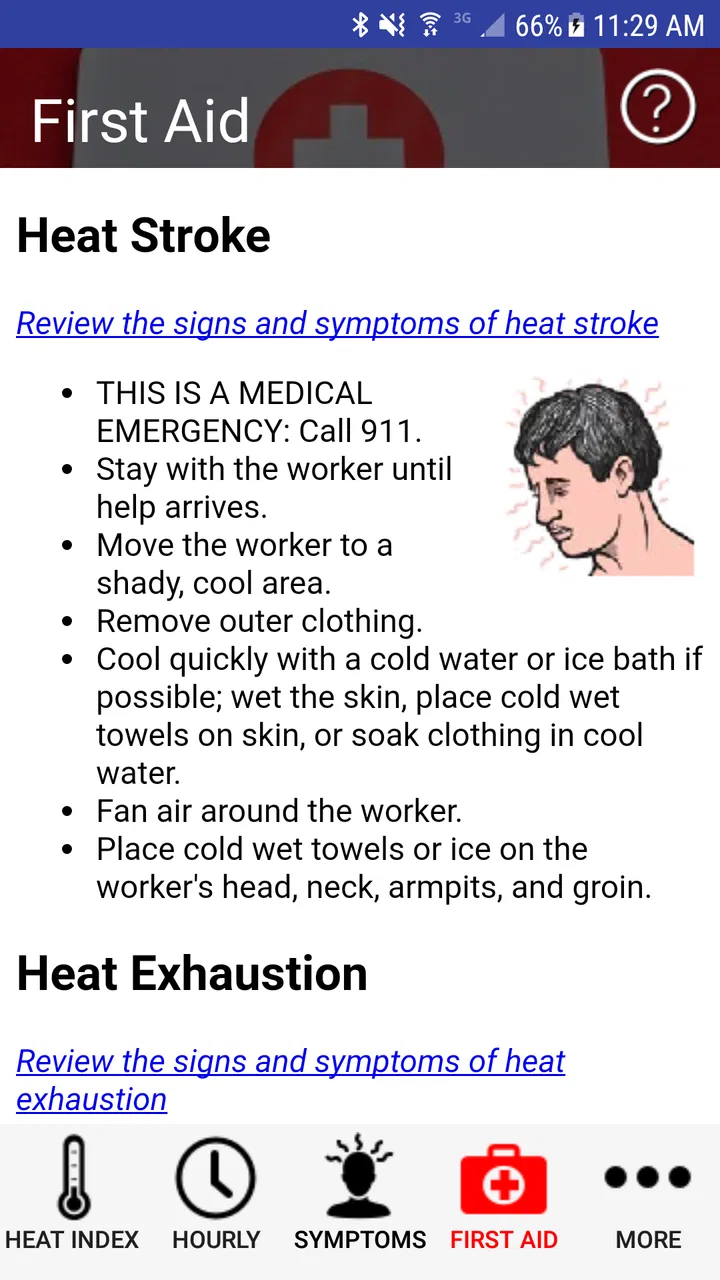
Once the result is visible, I would read the recommendation completely instead of stopping at the color or risk label. A risk category is easy to remember, but the accompanying worksite advice is where the app becomes practical. Look for the parts that relate to breaks, observation, workload, clothing, fluids, shade, or other changes that can reduce exposure. The exact response should fit the people and environment involved.
A realistic example would be a small landscaping crew preparing for an afternoon job. Before loading equipment, the supervisor checks the current heat conditions in the tool. The result indicates a level that deserves additional caution, so the crew shifts the heaviest work earlier, identifies a shaded recovery area, reminds everyone to watch for symptoms, and plans another check later. The app has not managed the job for them; it has helped turn a vague feeling of “it is very hot” into a structured conversation.
For an individual, the same workflow might look different. If I planned a long midday walk, I could check the heat index first and decide to go earlier, shorten the route, carry water, or choose an indoor alternative. If I already feel dizzy, weak, confused, or unusually unwell, I would not spend time trying to optimize the app’s result. I would stop the activity and seek appropriate help.
That is the first meaningful success I would look for: not a perfect number, but a safer choice made before exposure begins. This is also where the app’s narrow design works in its favor. It encourages me to think about heat stress specifically rather than letting the issue disappear among unrelated forecast details.
Where first-time users may get confused
The most likely confusion is assuming that the heat index describes every outdoor situation equally. Conditions in direct sun, heavy protective clothing, poor airflow, or strenuous work can feel more demanding than a basic heat-index calculation suggests. The result should therefore be interpreted together with the actual setting, not treated as a universal guarantee of safety.
Another common mistake is checking once and then assuming the answer remains valid all day. Heat, humidity, cloud cover, and activity levels change. A morning result may be reassuring while the afternoon becomes much more difficult. For a long outdoor task, I would make the calculation part of periodic supervision rather than a one-time formality.
It is also easy to confuse a risk recommendation with a personal health assessment. The tool can help identify environmental danger, but it does not know an individual’s medical history or how that person is responding in the moment. Someone who feels symptoms should be taken seriously even if the displayed level seems moderate.
The worksite recommendations may also require interpretation. They are not a substitute for training or a complete emergency plan. A manager still needs to know where cooling is available, how workers can report symptoms, who will respond, and what happens if conditions worsen. The app is strongest when it supports those arrangements rather than pretending to replace them.
I would also avoid using it as the only weather source. If I need to know whether thunderstorms could interrupt a job, whether wind affects a lift, or whether a severe weather alert is active, I would consult a broader forecast or official alert service as well. Heat safety is only one part of outdoor risk management, and this app should not be stretched into something it was not designed to be.
Small workflow improvements that make it more useful
My first practical tip is to establish a shared check-in habit instead of leaving the app on one person’s phone. If several people are involved in outdoor work, the person calculating the heat index should communicate the result and the planned response. That prevents the number from becoming a private observation that never changes anyone’s behavior.
Second, compare the result with the actual workload. A light task in shade and intense lifting in direct sun should not receive the same response simply because the calculated heat index is identical. The app gives a common environmental reference, while the person organizing the activity must account for exertion, clothing, pace, and recovery opportunities.
Third, use the tool before the point of no return. Checking after workers are already exhausted is less useful than checking during planning. I would place the calculation before equipment is loaded, routes are fixed, or a group has traveled to a remote location. That creates more options if the recommendation calls for a slower schedule or a different setting.
A fourth useful approach is to treat the result as a prompt for observation. Even when the risk level does not trigger a dramatic change, people should still watch one another and respond to symptoms. Heat illness can develop when someone is reluctant to speak up, especially in a group that is trying to finish a task. The app can start the conversation, but people must continue it.
Finally, I would keep the app’s role clear when explaining it to a first-time user. It is not a countdown, a pass-fail test, or a promise that an activity is safe. It is a compact way to calculate heat burden and connect that calculation with sensible protective actions. That framing prevents both overconfidence and unnecessary dismissal.
Who should choose it, and who should use something else?
I think this is a good choice for someone who wants a dedicated heat-safety reference without paying for another service. It suits outdoor supervisors, coaches, community organizers, and individuals who regularly plan activity in hot conditions. The recommendations are more relevant to those users than a simple temperature reading because they connect weather information with behavior.
It is also a sensible companion for people who already use a normal weather app. I would use the regular app to understand the wider forecast and this one to focus on heat exposure. That combination is more useful than expecting either app to cover every kind of outdoor risk perfectly.
I would skip it if my main need is a polished daily forecast with rich visual tools, detailed maps, or broad alert coverage. A general weather service will likely be more convenient for travel planning and ordinary day-to-day checking. I would also look elsewhere if I needed a full workplace scheduling, incident-reporting, or employee-monitoring system. This app is a focused calculator and guidance tool, not a complete operations platform.
People with medical concerns should be especially careful about how they use the result. The app can support preparation, but it cannot determine whether a particular person should exercise, work, or remain outdoors. When there is a conflict between the displayed category and how someone feels, I would prioritize the person’s symptoms and established medical advice.
My recommendation after using it
OSHA NIOSH Heat Safety Tool is easy to understand once I accept what it is: a specialized weather safety app built around heat index calculation and risk-level worksite guidance. Its free access, Everyone rating, and Android support from version 8.0 make it approachable, while the connection to the Centers for Disease Control and Prevention gives the tool a clear public-health purpose.
Its limitations are equally clear. It is not a complete forecast, it cannot account perfectly for every personal or environmental factor, and its older, focused design may feel less polished than a mainstream weather app. The average rating of 3.1 shows that not every user finds the experience ideal. Still, I would judge it by the decision it helps me make rather than by whether it resembles a feature-packed forecast service.
If I were recommending it to a friend, I would say: install it before the next hot outdoor activity, learn how to make a calculation when you are not rushed, and decide what actions you will take for each risk level. Use a broader weather source for storms and general forecasting, and never let a reassuring result override symptoms or common sense.
The app’s real success is turning heat awareness into a repeatable action. For a person who needs that specific help, it earns a place on the phone. For someone seeking an all-purpose weather companion, another option will be a better fit. I would keep this tool available as a focused safety check, especially when outdoor work or exercise makes heat more than just an uncomfortable forecast detail.
FAQs for OSHA NIOSH Heat Safety Tool
01What is the OSHA NIOSH Heat Safety Tool app used for?
The OSHA NIOSH Heat Safety Tool app is designed to help workers and supervisors in industries exposed to heat. It provides real-time heat index information and hourly forecasts, helping users make informed decisions to prevent heat-related illnesses. It also offers safety recommendations and guidance based on current conditions.
02How does the app calculate the heat index?
The app calculates the heat index by combining temperature and humidity data, providing users with an accurate representation of how hot it feels. This information is crucial for assessing the risk of heat-related illnesses and helps users take appropriate safety measures, such as hydration and rest breaks.
03Is the OSHA NIOSH Heat Safety Tool app available offline?
The app requires an internet connection to provide up-to-date heat index information and weather forecasts. However, once downloaded, users have access to general safety tips and guidelines offline. For the most accurate and current data, it’s recommended to check the app while connected to the internet.
04Who can benefit from using this app?
The app is particularly beneficial for outdoor workers, supervisors, and safety officers in industries such as construction, agriculture, and landscaping. It helps ensure workplace safety by providing crucial heat-related health and safety information, making it an essential tool for anyone working in hot conditions.
05Are the heat safety recommendations customizable?
Yes, the app allows users to input specific conditions and worksite details to receive customized safety recommendations. This feature ensures that advice is relevant and tailored to the user’s specific environment, enhancing the app’s effectiveness in preventing heat-related incidents.
Pros
- Real-time heat index updates for accurate information.
- Customizable safety guidelines for different work conditions.
- User-friendly interface simplifies navigation.
- Integrates GPS for location-specific data.
- Alerts for precautionary measures enhance safety.
Cons
- Requires internet for full functionality.
- Limited to English language support.
- Battery usage can be high with GPS active.
- No offline mode for remote areas.
- Lacks detailed historical data analysis.

OSHA NIOSH Heat Safety Tool
Gallery